
// reference build

Banksman

Construction & Infrastructure

The day on site, on record.

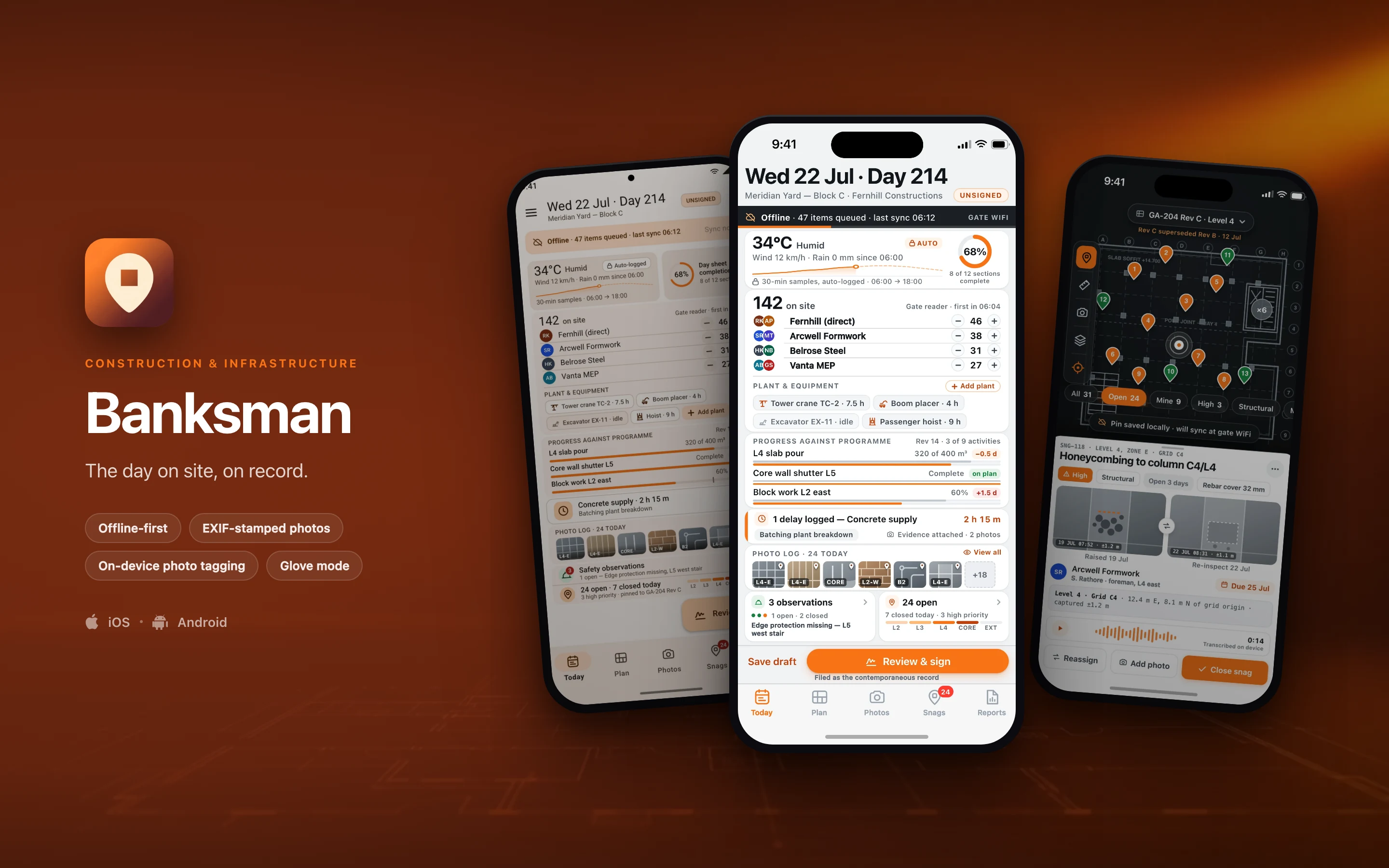
Banksman is the site engineer's daily record: crew and plant on site, weather logged automatically, progress against the programme, photo evidence by zone, delays and their cause, safety observations, and a snag list pinned to the floor plan — signed off and filed the same day. It is built for the engineer walking a slab with gloves on, a hard hat down over their eyes and no signal, and for the project manager, QS and client rep who later need to know exactly what happened on day 214. Every auto-filled value is visibly marked as auto-filled, because the sheet is a contemporaneous record and has to survive being read back in a dispute.

A BuildspaceLabs reference build. We designed Banksman in-house to show how we approach native mobile — it is not a client engagement, and every name, record and figure inside these screens is fictional demo data.

  • Offline-first
  • EXIF-stamped photos
  • On-device photo tagging
  • Glove mode
Banksman shown on three phones — Today's Log, Plan, Today's Log, in Material 3 — on a construction & infrastructure brand backdrop
// platforms

Two native designs, one shared core

Banksman is designed twice — once in the iOS idiom and once in Material 3 — on top of a shared domain core, rather than one layout wrapped twice for both stores. The frameworks below are the stack each side is specced against.

iOS

Swift · SwiftUI2 screens in this set

Android

Kotlin · Jetpack Compose · Material 31 screen in this set
// screens

The screens

3 surfaces from the build — 2 in the iOS idiom and 1 redesigned in Material 3 on Android. Everything inside the frames is fictional demo data.

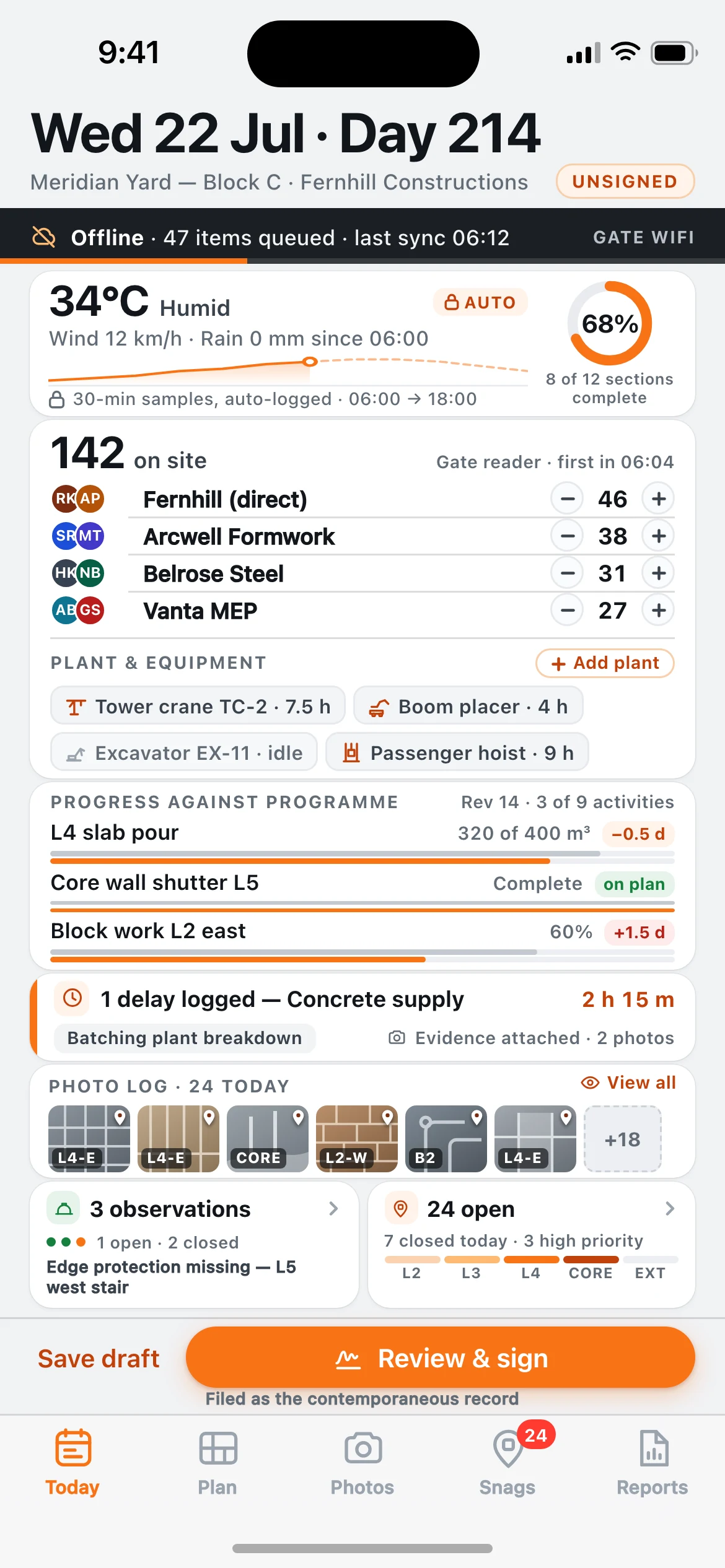
Banksman — the Today's Log screen, running on iOS
01iOS

Today's Log

Today's Log, Wed 22 Jul, Day 214. The day sheet in progress: offline sync strip, auto-logged weather with a 12-hour temperature sparkline, a 68% completion ring, 142 crew across four subcontractors with steppers, plant hours, three programme activities against plan, a 2 h 15 m concrete-supply delay, the zone-tagged photo log, safety observations and the open snag count — over a sticky "Review & sign" bar.
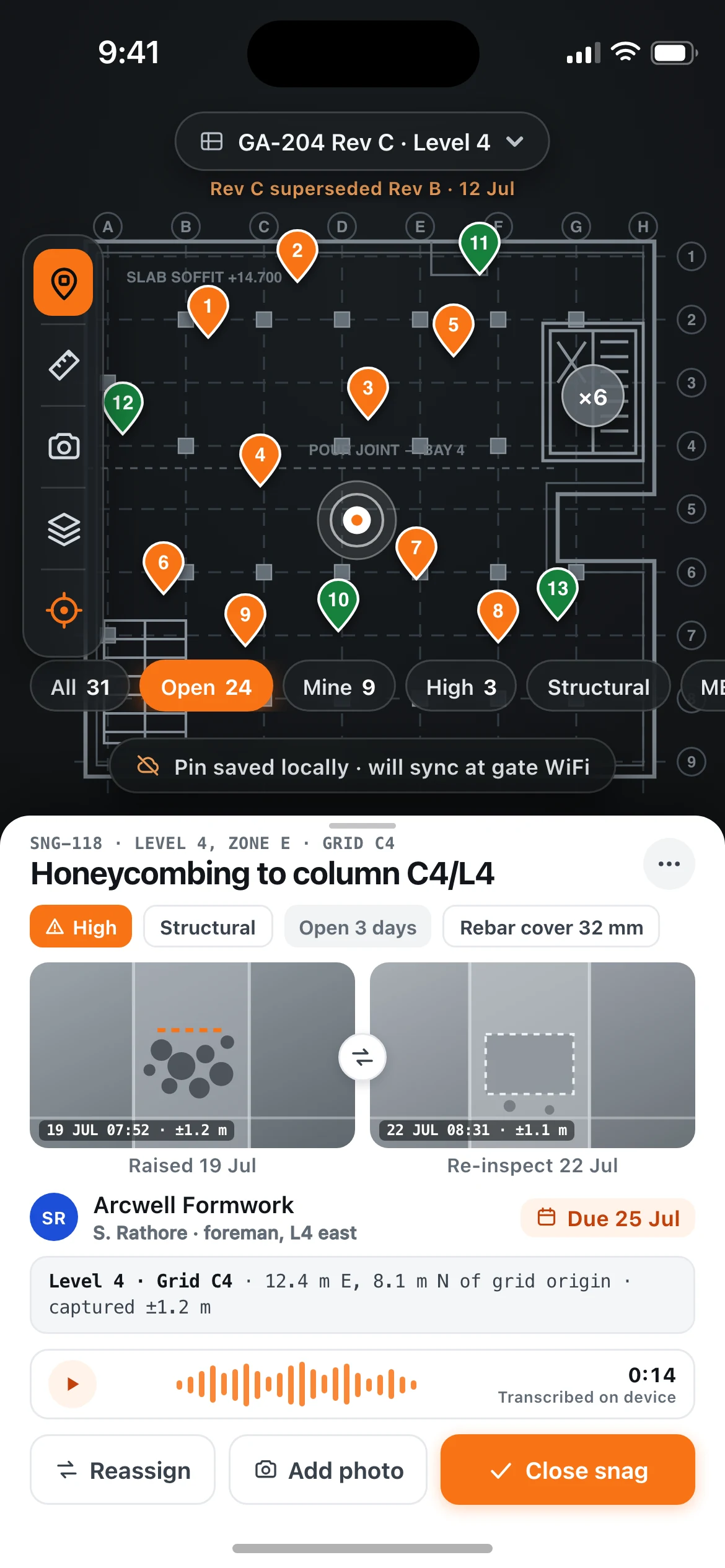
Banksman — the Plan screen, running on iOS
02iOS

Plan

Plan, Level 4 Zone E. The GA-204 Rev C floor plan with fourteen numbered pins, a clustered core, the drawing selector and a left-hand drawing toolbar, with snag SNG-118 (honeycombing to column C4/L4) open in a bottom sheet: before/after photos, assignment, grid location, an on-device voice-note transcript and the close action.

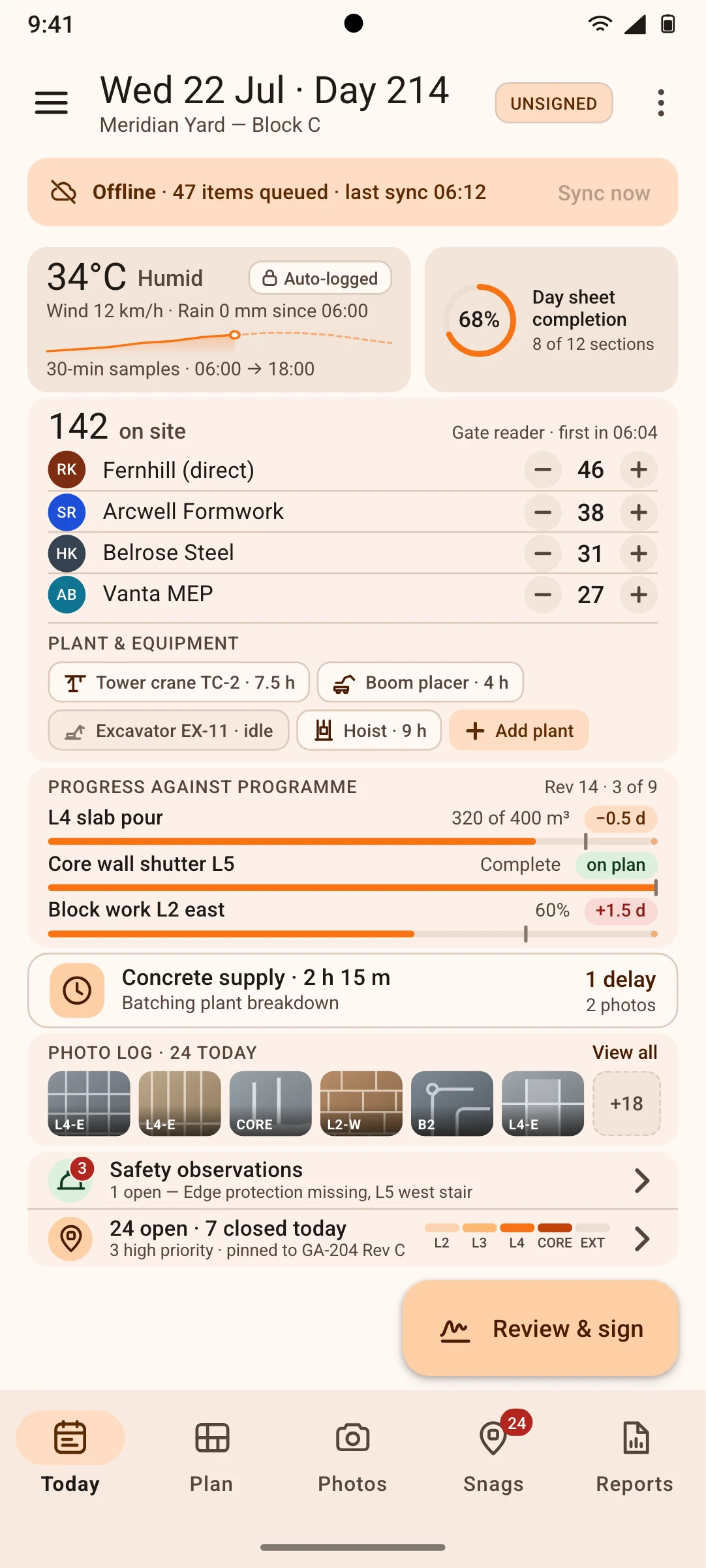
Banksman — the Today's Log, in Material 3 screen, running on Android
03Android

Today's Log, in Material 3

the same day sheet and the same demo data as the iOS home screen, rebuilt in Material 3: tonal offline banner, filled and outlined cards, list items with stepper icon buttons, input chips for plant, linear progress with stop indicators, an extended FAB and a navigation bar with a badged Snags destination.

// why native

Why it has to be native

The case for building this twice rather than wrapping a web app. Each one is designed around an operating-system capability a browser either cannot reach or cannot be trusted to hold.

A full shift has to be recorded with the radio off

An offline-first SQLite store in WAL mode holds the day sheet plus 200+ full-resolution photos, with an append-only audit log and conflict-free merge on reconnect. The queue drains at the site-gate WiFi; a web app cannot hold that volume or guarantee the write survived.

The evidence has to carry its own proof of place

AVFoundation and CameraX burst capture stamps EXIF GPS, compass heading and a barometric floor estimate into every progress photo at the moment of capture, so a photo of a column knows which floor it was taken on.

Photo tagging runs on the device, not on someone's server

Core ML on iOS and LiteRT on Android tag the subject (rebar, formwork, blockwork, MEP riser) and OCR the printed zone placard in frame. Site imagery is commercially sensitive and never has to leave the phone to be classified.

Direct sun and moving plant change the UI

The ambient light sensor and accelerometer drive an automatic hi-vis contrast boost and glove mode — 48pt hit targets and haptic confirmation — when the phone detects glare or vehicle motion.

Weather must be contemporaneous, not remembered

Background WeatherKit and fused-location sampling writes temperature, wind and rainfall onto the log every 30 minutes without the app being opened, so nobody reconstructs the conditions at 17:45.

Drawings are enormous and pins must land on the right grid square

PDFKit and PdfRenderer tile 200 MB drawing sets with cached pyramids for pinch-zoom pin placement at 1:50, and the Secure Enclave / Android Keystore signature capture produces a tamper-evident hash on the filed sheet.

// stack

The stack it is designed for

The target architecture this build is specced against, chosen per constraint rather than per habit — the stack shifts with the problem.

  • Swift 6 with SwiftUI and the Observation framework, targeting iOS 18
  • Kotlin 2.x with Jetpack Compose and Material 3 expressive, targeting Android 15
  • Kotlin Multiplatform shared domain, validation and sync engine via SQLDelight
  • SQLite in WAL mode as the local source of truth, with CRDT merge and an append-only audit log
  • Core ML on iOS and LiteRT on Android for on-device photo tagging and zone-placard OCR
  • PDFKit on iOS and PdfRenderer with a custom tile cache on Android for large drawing sets
  • CameraX and AVFoundation capture pipelines, WeatherKit with an Open-Meteo fallback
  • Postgres with PostGIS on Cloud Run, S3-compatible object storage for photo originals, signed PDF day sheets rendered server-side
// next

Working on something shaped like this?

Banksman is a reference build, so there is nothing to buy on this page. If your team has a problem that needs this kind of depth — offline for a full shift, real sensors, work that has to happen with the screen off — tell us about it and we will tell you honestly whether we are the right people to build it.