// reference build

Nightdock

Logistics — last-mile and regional freight (driver companion)

The whole runsheet, offline.

Nightdock is the driver-facing companion app for a last-mile or regional freight carrier. It carries the day's manifest, sequences the stops, hands off to turn-by-turn navigation, scans parcels on pickup and drop, captures photo-and-signature proof of delivery, records exceptions and keeps hours-of-service in view. It is built for the driver in the cab and at the door — and for the dispatcher who needs every stop reconciled by the end of the shift — so it has to finish a stop in a basement dock with no bars and reconcile itself the moment signal returns. The carrier, the consignees and every number shown in these screens are fictional.

A BuildspaceLabs reference build. We designed Nightdock in-house to show how we approach native mobile — it is not a client engagement, and every name, record and figure inside these screens is fictional demo data.

  • Offline outbox
  • Barcode scan
  • Geofenced arrival
  • CarPlay & Android Auto
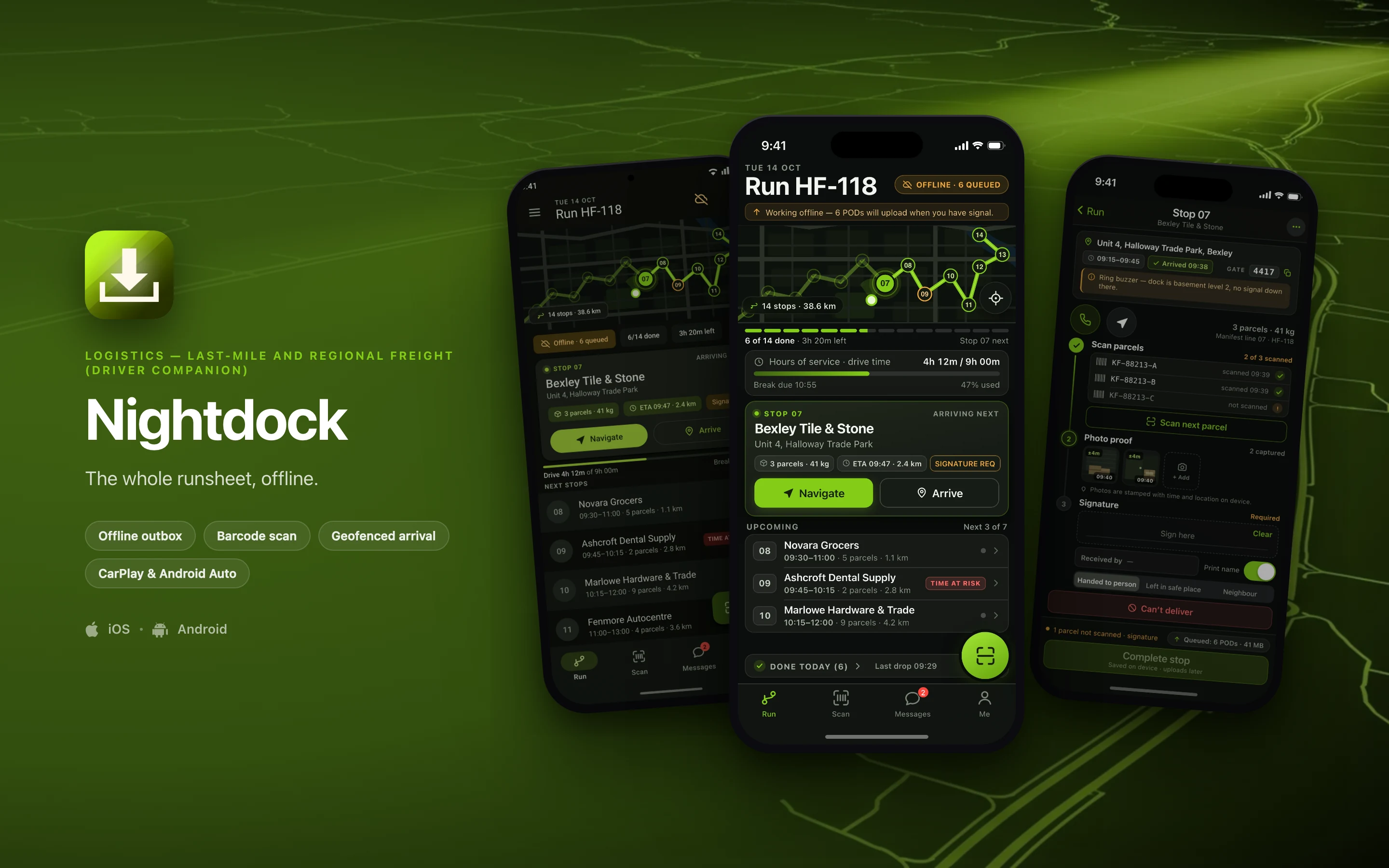
Nightdock shown on three phones — Today's Run, Stop 07 · Proof of Delivery, Today's Run, Material 3 — on a logistics brand backdrop
// platforms

Two native designs, one shared core

Nightdock is designed twice — once in the iOS idiom and once in Material 3 — on top of a shared domain core, rather than one layout wrapped twice for both stores. The frameworks below are the stack each side is specced against.

iOS

Swift · SwiftUI2 screens in this set

Android

Kotlin · Jetpack Compose · Material 31 screen in this set
// screens

The screens

3 surfaces from the build — 2 in the iOS idiom and 1 redesigned in Material 3 on Android. Everything inside the frames is fictional demo data.

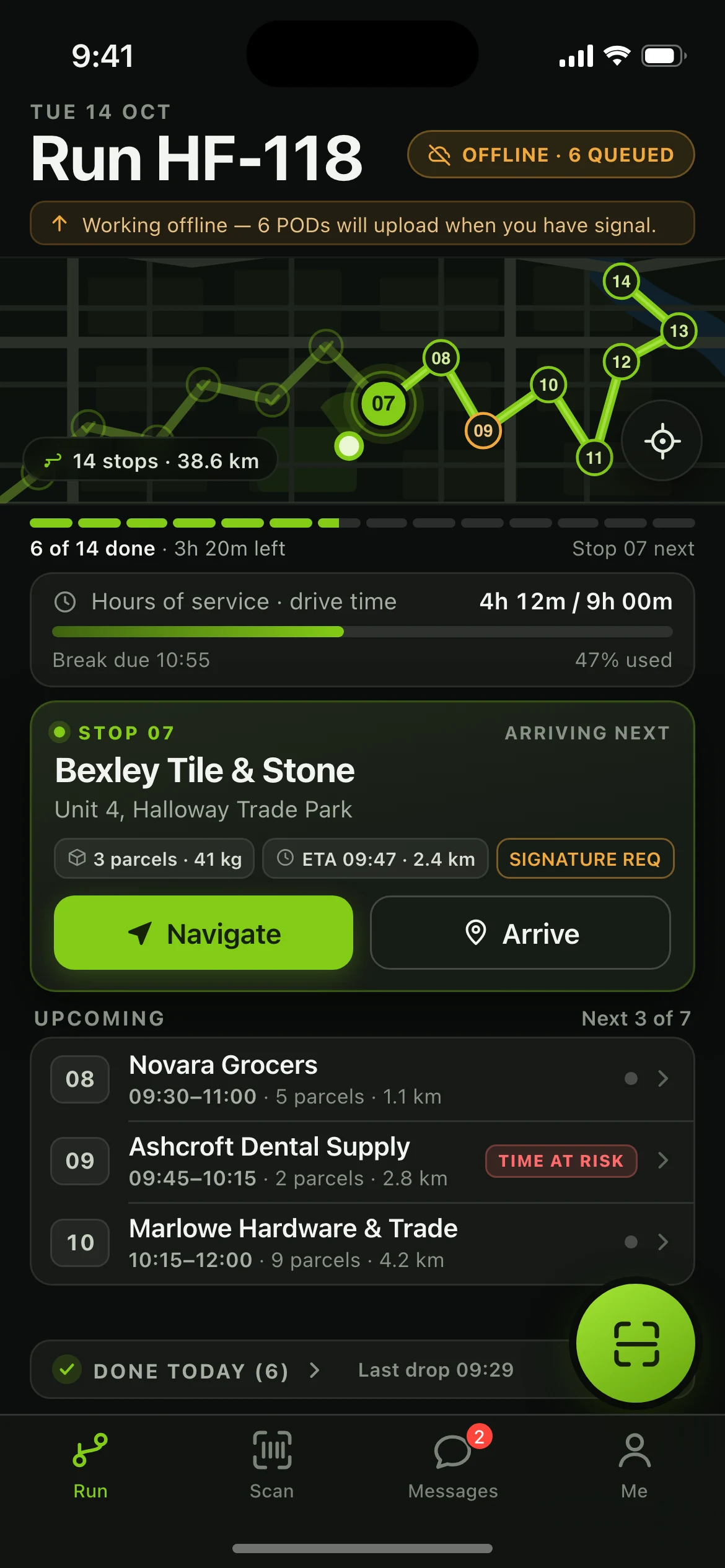
Nightdock — the Today's Run screen, running on iOS
01iOS

Today's Run

The screen a driver opens at 05:40 and returns to forty times a day: run header with an offline sync chip, dark route map with 14 numbered stops and a pulsing active pin, segmented progress rail, hours-of-service meter, the Stop 07 hero card with Navigate and Arrive, the upcoming stop list with a time-at-risk flag, the collapsed done-today section and a sticky Scan action.
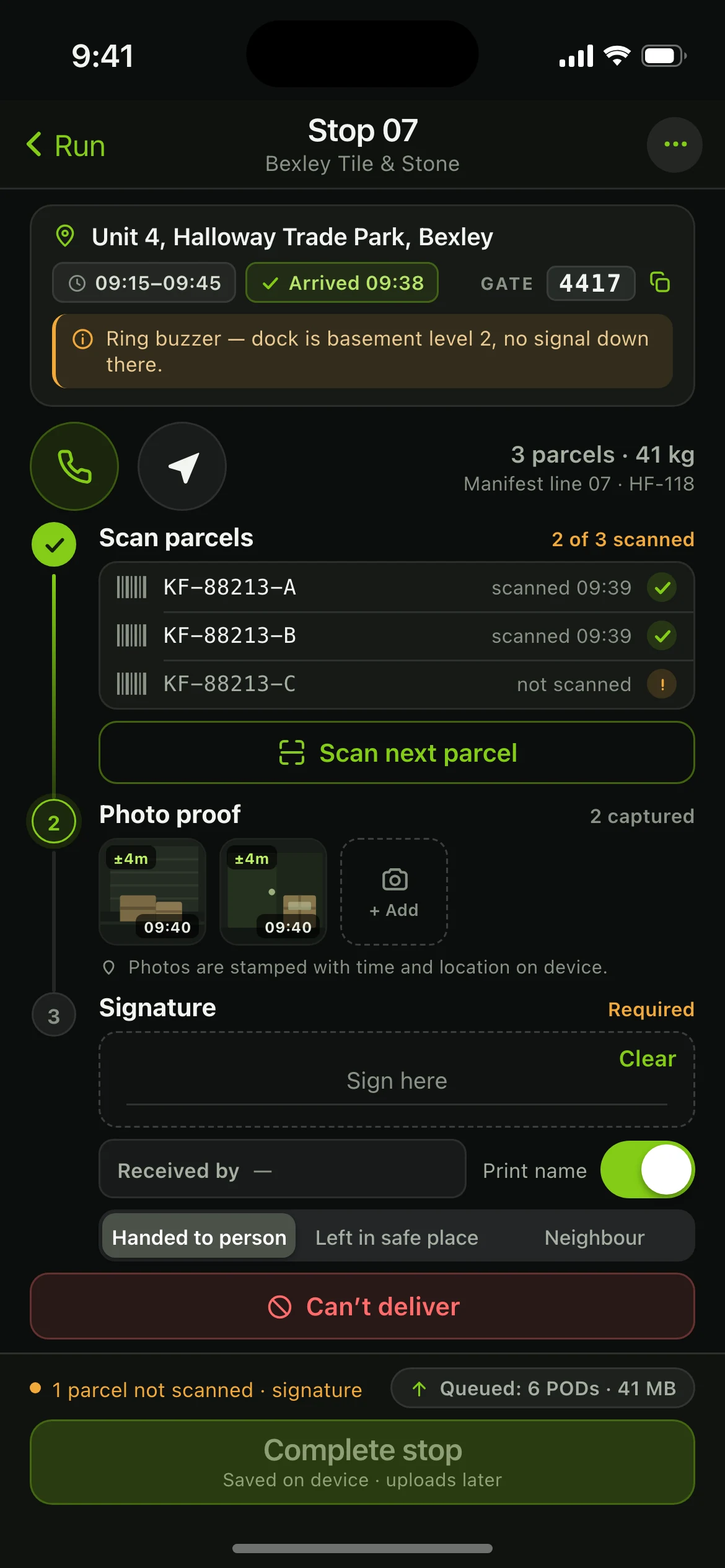
Nightdock — the Stop 07 · Proof of Delivery screen, running on iOS
02iOS

Stop 07 · Proof of Delivery

The ninety seconds at the door as one vertical capture flow: consignee card with window, arrival stamp, gate code and driver note; a three-step rail through parcel scanning, photo proof and signature; delivery-outcome control; a can't-deliver path; and an action bar that stays disabled while it names what is still missing.

Nightdock — the Today's Run, Material 3 screen, running on Android
03Android

Today's Run, Material 3

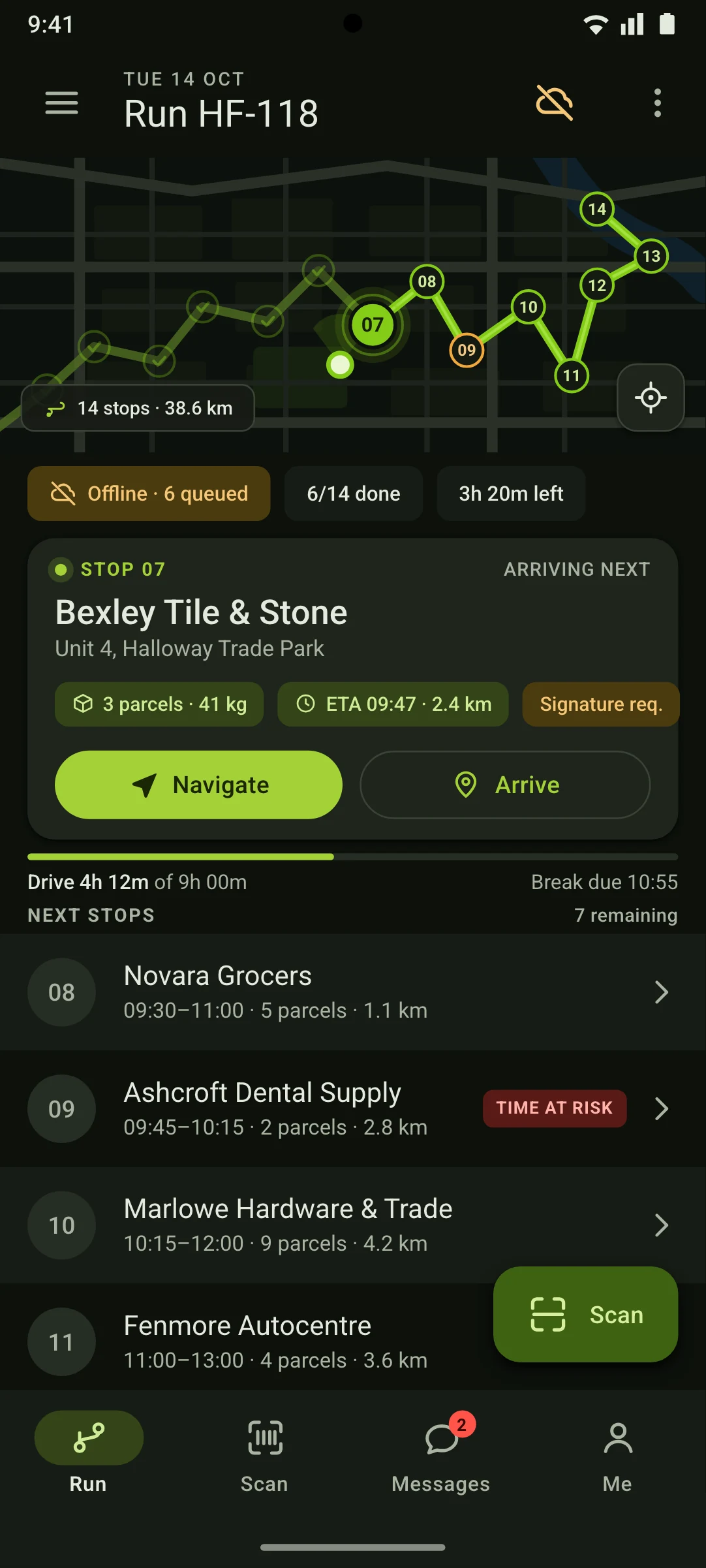
The same run, the same records and the same numbers as the iOS home — the taller viewport simply fits one more stop row — rebuilt with an M3 top app bar, assist-chip row, elevated next-stop card, linear progress indicator, list items with tonal surface steps, an extended Scan FAB and a navigation bar with a pill indicator.

// why native

Why it has to be native

The case for building this twice rather than wrapping a web app. Each one is designed around an operating-system capability a browser either cannot reach or cannot be trusted to hold.

Nothing can depend on the network at the door

Every scan, photo, signature and exception is written to on-device SQLite first and queued in a durable outbox that survives a force-quit or a flat battery mid-run, then replays in order with conflict resolution once signal returns. A web app's storage is evictable and its critical path is the wire.

Barcode decode has to be hardware-fast in bad light

AVFoundation + Vision on iOS and CameraX + ML Kit on Android read Code 128, GS1-128, ITF-14 and QR at camera framerate with torch control — plus hardware-trigger support for rugged Zebra and Honeywell handhelds over the DataWedge intent API, which a browser cannot bind to at all.

Arrival has to be detected with the screen off

60 m geofences arm the next stop and stamp the arrival time from an Android foreground service with a persistent run notification, and from an iOS background-location mode, while the phone sits in a cradle.

The map and the ETA maths must work underground

Vector tiles for the day's bounding box are pre-downloaded and stop sequencing runs on-device, with deep-link handoff to Apple Maps or Google Maps for the actual driving leg.

Proof has to be trustworthy at capture time

Photos are compressed and stamped with EXIF time and GPS fix accuracy before they ever leave the handset, signatures come off the touch digitizer with pressure, and the whole queue is encrypted at rest through Keychain and the Android Keystore.

Peripherals and in-vehicle surfaces are OS-level

Bluetooth LE and USB-OTG pairing to cab-mounted Zebra ZQ-class label printers and ring scanners, plus CarPlay and Android Auto scenes that show only the next stop and a Navigate action while the vehicle is moving.

// stack

The stack it is designed for

The target architecture this build is specced against, chosen per constraint rather than per habit — the stack shifts with the problem.

  • Kotlin Multiplatform shared core — domain model, stop state machine and the offline sync engine written once, consumed by both UIs
  • SwiftUI + Swift Concurrency on iOS 18+, with MapKit vector maps and CarPlay scene support
  • Jetpack Compose + Material 3 on Android 14+, with Maps SDK night styling and Android Auto support
  • SQLDelight over SQLite as the on-device source of truth, with a versioned outbox table and last-write-wins-plus-vector-clock reconciliation for POD conflicts
  • ML Kit Barcode Scanning on Android and Vision VNBarcodeObservation on iOS, behind one shared scanner interface, with Zebra DataWedge intents for rugged hardware
  • Ktor client speaking protobuf over HTTP/2, with resumable multipart uploads for photo and signature payloads and exponential backoff on flaky cell
  • FCM and APNs for mid-run manifest changes, plus WorkManager and BGTaskScheduler for opportunistic background flush of the queue
  • Fastlane, Gradle Managed Devices and Maestro flows in CI, including scripted airplane-mode scenarios that assert a full stop can be completed and replayed offline
// next

Working on something shaped like this?

Nightdock is a reference build, so there is nothing to buy on this page. If your team has a problem that needs this kind of depth — offline for a full shift, real sensors, work that has to happen with the screen off — tell us about it and we will tell you honestly whether we are the right people to build it.